Audiobooks & ebooks
Select Audiobook / Ebook in the Source dropdown. You get one .mp4 video per chapter in output/final/, with the audio and embedded subtitles.
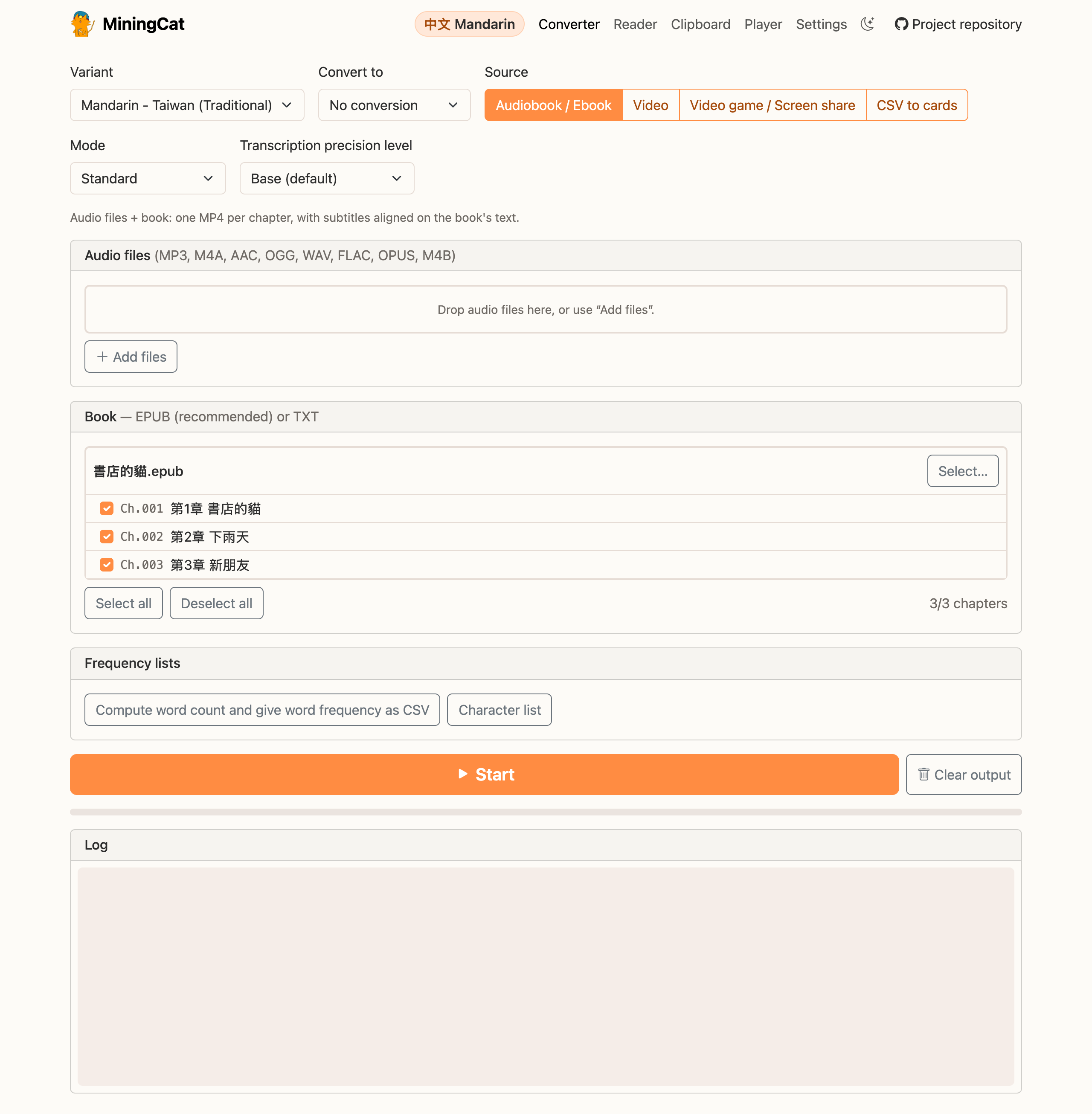
Pick a mode
The Mode dropdown depends on what you have:
| You have | Mode | Subtitles come from | Audio comes from |
|---|---|---|---|
| Ebook and audiobook | Standard | the ebook text | the audiobook |
| Audiobook only | Generate subtitles | Whisper transcription | the audiobook |
| Ebook only | Generate audio | the ebook text | text-to-speech |
Standard mode
Provide an ebook and the matching audio files. MiningCat splits the book into chapters, then uses Whisper to align the book text on the narration: the subtitles are the author's exact words, with the timing of the narrator.
This gives the best subtitles, so use it whenever you have both files.
The book and the audio must match
The chapters of the ebook are matched with the audio files in order. If your ebook has extra content that isn't narrated (table of contents, preface, notes...), deselect those chapters, see Chapter selection.
Generate subtitles mode
Provide the audio files only. Whisper transcribes the audio to build the subtitles.
Subtitles are less accurate than in standard mode (Whisper can mishear words, or pick the wrong character), but it's handy when you don't have the ebook. Choose a higher precision for better results.
Generate audio mode
Provide the ebook only. The audio is generated with edge-tts by default (online, faster), or with
OmniVoice, a local voice (make install-omnivoice), when Settings › Voice doesn't
use edge-tts (OmniVoice also takes over when Edge fails), or with ElevenLabs when
you set it up (it uses your credits: a book has hundreds of thousands of characters). The subtitles come from the text.
Pick a voice in the Voice panel (a few voices are available per language). Synthetic voices are less natural than a real narrator, but it's a great option when there is no audiobook.
Inputs
Book (panel Book - EPUB (recommended) or TXT)
.epub: chapters are read from the book. Recommended..txt: a single file is treated as one chapter. Select several.txtfiles to get one chapter per file.
Audio files (panel Audio files)
- A single
.m4bfile is split using its chapter markers. - Otherwise, each audio file is one chapter, in file-name order. Name them so they sort correctly (
01.mp3,02.mp3... rather than1.mp3,10.mp3,2.mp3).
Chapter selection
Once an .epub is loaded, its chapters are listed in the book panel. Highlight the chapters you want (or use Select all / Deselect all): only those are processed.
This is how you make the book match the audio, for instance by skipping the table of contents, a preface or an afterword that the audiobook doesn't have.
In the CLI, use --range 4-9 or --chapters 3,4,5 (see the CLI reference).
Precision
Transcription Precision Level selects which Whisper model is used. It's hidden in Generate audio mode since Whisper isn't used there.
| Precision | When to use it |
|---|---|
| Tiny | Standard mode: alignment only needs timing, so the smallest model is enough and a bit faster. |
| Base (default) | Good for most uses. |
| Small, Medium | Better transcription, slower. |
| Large, Turbo | Best transcription, slowest (Turbo is a faster large-v3). Useless in standard mode, the text comes from the book. |
Info
Some languages (like Cantonese) are only supported by Whisper's large models. For those, only Large and Turbo are offered.
The first time you use a model, Whisper downloads it, so the first run takes longer.
Qwen3-ASR (optional)
Qwen3-ASR (Alibaba, Apache 2.0) can replace Whisper to transcribe all the languages of MiningCat. It's often more accurate, especially for Chinese and Cantonese, but its install is large (PyTorch models of 1.8 GB for 0.6B, 4.7 GB for 1.7B), so it isn't part of the regular install. Taigi, which Whisper doesn't know, needs it: make install-taigi installs it with Taigi's other engines.
Once installed, Qwen3-ASR 0.6B and Qwen3-ASR 1.7B (more accurate, slower) are offered after Whisper's models in Generate subtitles mode and for videos. Qwen3-ASR only transcribes: in standard mode, the book is still aligned with Whisper. On the command line, use --model qwen3-0.6b or --model qwen3-1.7b. An NVIDIA GPU or an Apple Silicon Mac makes it much faster, but a CPU works.
Character conversion
For Mandarin and Cantonese, Convert to converts the subtitles between simplified and traditional scripts with OpenCC, including punctuation (e.g. “” or 「」). Useful if you're learning traditional characters but only found a mainland edition, or the other way around.
Next steps
- Read the book in MiningCat's reader, with its audio: click Read with audio when the conversion is done.
- Build a frequency list of the words or characters of the selected chapters.
- Prefer the terminal? Everything is also available in the CLI.